

| Print Head/Consumables | |
| Number of Nozzles | Total 4,352 nozzles |
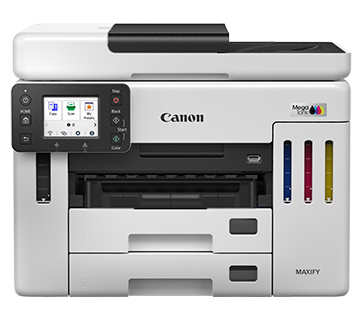
| Ink Bottles (Type/Colours) | GI-76 (Pigment Ink/Black, Cyan, Magenta, Yellow) |
| Maintenance Cartridge | MC-G01 |
| Maximum Print Resolution | 600 (Horizontal) x 1,200 (Vertical) dpi |
| Print Speed*1 (Approx.) Click here for Summary Report Click here for Document Print and Copy Speed Measurement Conditions | |
| Document (ESAT/Simplex)*2 | 24 / 15.5 images per minute (Mono/Colour) |
| Document (ESAT/Duplex)*2 | 13 / 10 images per minute (Mono/Colour) |
| Document (FPOT Ready/Simplex)*3 | 5.5 / 7 s (Mono/Colour) |
| Print Width | Up to 206.0 mm (203.2 mm) |
Scan*4
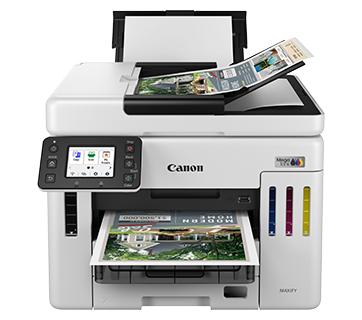
| Scanner Type | Platen / ADF (Auto Document Feeder) |
| Scanner Technology | Contact Image Sensor (CIS) |
| Duplex Scanning | Available (Single Pass, 2-Sided Scan) |
| Optical Resolution*5 | 1,200 x 1,200 dpi |
| Scanning Bit Depth (Output) | |
| Greyscale | 8 bit |
| Colour | RGB each 8 bit |
| Maximum Document Size | |
| Platen | A4, LTR |
| ADF | A4, LTR, LGL |
| Scan Features | Save to PC, Attach to E-mail, Multi-Page PDF, Save to USB Flash Memory, Unsharp Mask, Descreen, Reduce Slow-Through, Rescan, Rotate (PDF only), Auto Crop, Scan to Folder |
Copy
| Copy Speed*6 (Approx.) Click here for Summary Report Click here Document Print and Copy Speed Measurement Conditions | |
| Document (sFCOT/Simplex) | 12 s (Colour) |
| Document (sESAT/Simplex) | 12.7 images per minute(Colour) |
| Document (ADF) (ESAT/Simplex) | 22.2 / 12.2 images per minute(Mono/Colour) |
| Maximum Copies | 99 copies |
| Maximum Document Size | A4, LTR |
| Reduction/Enlargement | 25 – 400% |
| Copy Features | Two-sided, 2-on-1, 4-on-1, Collate (ADF only), Frame Erase (Flatbed only), ID Copy, Oversized Copy |
Fax
| Type | Desktop Transceiver (Super G3/Colour Communication) |
| Transmission Speed*7 (Approx.) | |
| Mono | 3 s |
| Colour | 1 min |
| Modem Speed | Max. 33.6 kbps (Automatic Fall Back) |
| Compression | |
| Mono | MH, MR, MMR |
| Colour | JPEG |
| Gradation | |
| Mono | 256 levels |
| Colour | 24 bit Full Colour (RGB each 8 bit) |
| ECM (Error Correction Mode) | Available |
| Automatic Dialling | |
| Coded Speed Dialling | Max. 100 locations |
| Group Dialling | Max. 99 locations |
| Transmission/Reception Memory*8 | Approx. 250 pages |
| Scanning Width | A4, LTR |
PC Fax
| Type | Windows, macOS |
| Mono/Colour | B/W Transmission only |
Paper Handling
| Print Margin | |
| Bordered Printing | Envelope (COM10, DL, C5, Monarch): Top/Bottom: 12.7 mm, Left/Right: 5.6 mm101.6 × 152.4 mm, 127 × 177.8 mm, 177.8 × 254 mm, 203.2 × 254 mm: Top: 3 mm, Bottom: 5 mm, Left/Right: 3.4 mm Square (127 x 127 mm): Others: |
| Bordered Auto 2-Sided Printing | Top/Bottom/Left/Right: 5 mm |
| Supported Media | |
| Rear Tray | Plain Paper (64 – 105 g/m²) High Resolution Paper (HR-101N) Photo Paper Pro Luster (LU-101) Photo Paper Plus Glossy II (PP-201, PP-208) Matte Photo Paper (MP-101) Envelope |
| Cassette 1 / 2 | Plain Paper (64 – 105 g/m²) |
| Paper Size | |
| Rear Tray | A4, A5, A6, B5, LTR, LGL, 101.6×152.4 mm, 127×177.8 mm, 177.8×254 mm, 203.2x 254 mm, Square (127 x 127 mm), Envelope (COM10, DL, C5, Monarch), B-Oficio, M-Oficio, Foolscap, Legal (India), Executive [Custom Size] |
| Cassette 1 | A4, LTR, A5, B5, Executive [Custom Size] |
| Cassette 2 | A4, LTR, LGL [Custom Size] |
| Auto 2-Sided Printing (Plain Paper: 64 g/m²) | A4, LTR |
| Paper Weight | |
| Rear Tray | Plain Paper: 64 – 105 g/m² Canon Paper: Approx. 265 g/m² (Max.) (Photo Paper Plus Glossy II, PP-201) |
| Cassette 1 / 2 | Plain Paper: 64 – 105 g/m² |
| Maximum Capacity | |
| Rear Tray | Plain Paper (A4/LTR, 64 g/m²): 100 Photo Paper Plus Glossy II (PP-201/PP-208, 101.6×152.4 mm): 20 Matte Photo Paper (MP-101, 101.6×152.4 mm): 20 |
| Cassette 1 / 2 | Plain Paper (A4/LTR, 64 g/m²): 250 |
| Auto Document Feeder | A4, LTR = 50, LGL = 10, Others = 1 |
Network
| Protocol | SNMP, HTTP, TCP/IP (IPv4/IPv6) |
| TLS | 1.3 / 1.2 / 1.1 / 1.0 |
| Wired LAN | |
| Type | IEEE 802.3u (100BASE-TX) / IEEE 802.3 (10BASE-T) |
| Security | IEEE 802.1X (EAP-TLS/EAP-TTLS/PEAP) |
| Wireless LAN | |
| Type | IEEE 802.11b/g/n |
| Frequency Band | 2.4 GHz |
| Channel | 2.4 GHz: 1 – 13 (TW: Supported Channels: 1 – 11 only)*9 |
| Security | WPA-PSK (AES) WPA2-PSK (AES) WPA3-SAE (AES) WPA-EAP (AES)*10 WPA2-EAP (AES)*10 WPA3-EAP (AES)*10 |
| Direct Connection (Wireless LAN) | 2.4 GHz: Available |
Printing Solutions
| Canon Printing Apps | |
| Mobile (iOS/Android) | Canon PRINT, Easy-PhotoPrint Editor |
| PC (Windows/Mac) | Canon PRINT, Easy-PhotoPrint Editor, Easy-Layout Editor (Win only), PosterArtist Lite (Win only), PosterArtist Web (browser-based) |
| Mobile/Cloud Printing Solutions | AirPrint®, Mopria® Print Service, Canon Print Service (Android), Wireless Direct, Cloud Integration Service |
System Requirements
| OS System Compatibility*11 | Windows 11 / 10 / 8.1 / 7 SP1, macOS 11.7.6 ~ 14 or later, ChromeOS |
General Specifications
| Operation Panel | |
| Display | 6.7cm LCD (2.7in) (Touch-Screen) |
| Interface | USB 2.0, USB Flash Memory |
| Operating Environment*12 | |
| Temperature | 5 – 35°C |
| Humidity | 10 – 90% RH (no dew condensation) |
| Recommended Environment*13 | |
| Temperature | 15 – 30°C |
| Humidity | 10 – 80% RH (no dew condensation) |
| Storage Environment | |
| Temperature | 0 – 40°C |
| Humidity | 5 – 95% RH (no dew condensation) |
| Quiet Mode | Available |
| Acoustic Noise (PC Print)*14 | |
| Plain Paper | 49 dB(A) |
| Power Requirements | AC 100 – 240 V, 50/60 Hz |
| Power Consumption (Approx.) | |
| OFF | 0.06 W |
| Standby (USB connection to PC) | 0.9 W |
| Operation (USB connection to PC)*15 | 21 W |
| Duty Cycle | Up to 45,000 pages/month |
| Dimensions (W x D x H) (Approx.) | |
| Factory Configuration | 399 x 410 x 314 mm |
| Output/ADF Trays Extended | 399 x 645 x 387 mm |
| Weight (Approx.) | 13.1 kg |
Page Yield*16
| Plain Paper Click here for more information | A4 Colour Documents*17: GI-76 PGBK: 6,000 pages (Economy Mode*18: 9,000 pages) GI-76 C, M, Y: 14,000 pages (Economy Mode*18: 21,000 pages) |
- Print speed may vary depending on system configuration, interface, software, document complexity, print mode, page coverage, type of paper used etc.
- Document print speeds are the average of ESAT, based on the Office Category Test (Word, Excel, PDF), the default simplex mode, and the ISO/IEC 24734 standard. Click here to find out more.
- Document print speeds are the average of FPOT, based on the Office Category Test, the default simplex mode, and the ISO/IEC 17629 standard. Click here to find out more.
- TWAIN driver (ScanGear) is based on the TWAIN specification V1.9 and requires the Data Source Manager comes with the operating system.
- Optical resolution scan is available, only when you use TWAIN Driver. Optical resolution is a measure of maximum hardware sampling resolution, based on ISO 14473 standard.
- Copy speeds are the average of sFCOT and sESAT, based on ISO/IEC 29183 standard.
Copy speeds (ADF) are ESAT of copy in sequence, based on ISO/IEC 24735 standard.
Copy speed may vary depending on document complexity, copy mode, page coverage, type of paper used etc. and does not take into account warm-up time. - Black & white document fax transmission speed is based on default setting using ITU-T No.1 chart. Colour document fax transmission speed is based on default setting using Canon Colour Fax Test Sheet. Actual transmission speed may vary depending on document complexity, fax settings at receiving end, and line conditions etc.
- Page count is based on ITU-T No.1 chart or Canon FAX Standard Chart No.1.
- 2.4 GHz and 5 GHz (Wireless LAN IEEE 802.11a/ac/b/g/n) is applicable for Taiwan models only.
- Available with IEEE 802.1X (EAP-TLS/EAP-TTLS/PEAP).
- Please visit https://asia.canon/support to check OS compatibility and to download the latest driver updates.
- The performance of the printer may be reduced under certain temperature and humidity conditions.
- For the temperature and humidity conditions of papers such as photo paper, refer to the paper’s packaging or the supplied instructions.
- Acoustic Noise is measured based on ISO 7779 standard using default settings.
- When copying ISO/JIS-SCID N2 (printed by inkjet printer) on A4 size plain paper using default settings.
- Page yields may vary depending on content coverage, print settings, temperature, humidity, and frequency of printing.
- Declared yield value is the estimated value based on Canon internal test method using the ISO/IEC 24712 colour chart, simulating continuous printing with the replacement ink bottles (excluding initial setup). The declared colour yield is based on composite colour, using Cyan, Magenta and Yellow ink bottles.
- The Economy mode reduces the ink consumption by lowering the density. More pages can be printed using this mode. The page yield (A4 size) is based on the consumption data from the succeeding ink bottle but not the first ink bottle. Page yield is the estimated value based on Canon individual test method using the ISO/IEC 24712 chart under ideal print conditions & continuous printing simulation with the replacement after initial setup. Mentioned print yield is from the replacement set of 4-ink bottles (C/M/Y/BK). Black bottle contains 170ml ink and each colour bottle contains 135ml of ink. Page yield varies significantly depending on contents printed and other factors.